Main Games catalog Warranty Problems with cheat Products status Contacts
Game:

Albion online

Buy MASON-Radar Albion Online Cheat for Albion online – Aimbot, ESP

Undetected

Popular

Aimbot

ESP

Undetected

Product evaluation

0.0
+0
Overview
Features
Requirements & Guide

Software Description

MASON-Radar Albion Online is a reliable private cheat for the game Albion online. The software is equipped with a full range of functions for a comfortable game and quick superiority over your opponents. Includes functional groups: MAIN, RESOURCES, CHESTS, VISUAL EFFECTS. The developers regularly update the software for the latest game patches, optimize performance and guarantee stable anti-cheat bypass.

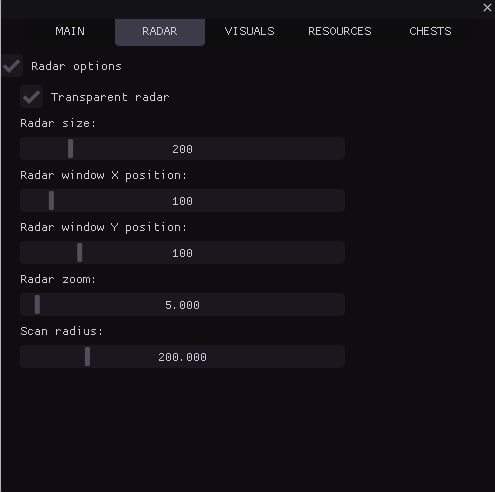
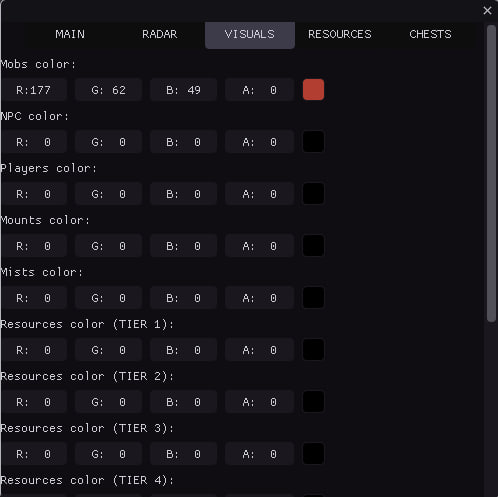
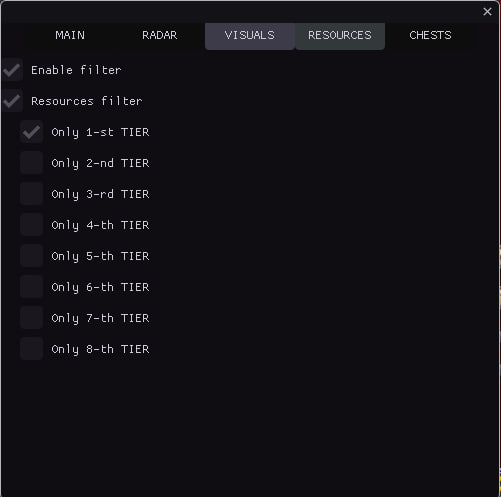
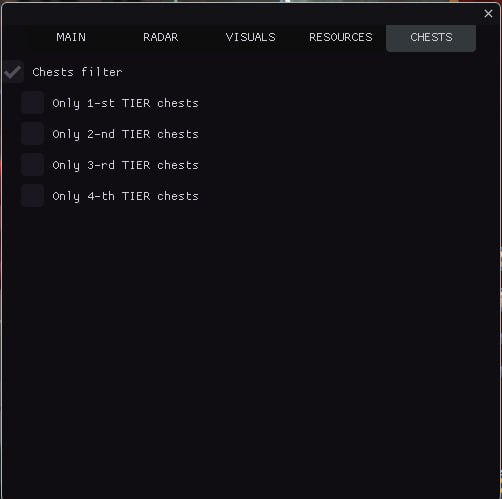
Software Overview (Video & Screenshots)

Video
Screenshot
Screenshot
Screenshot
Screenshot
Screenshot

System requirements

Game client:
Steam Steam
Processor: Intel и AMD
System: Windows 10, 11
Window mode: Оконный или оконный без рамок
Spoofer: Нет
USB-flash: Нет

Launch instructions

  1. Before launching, make sure to completely disable all third-party antivirus software and Windows Defender.
  2. Download the software loader from your personal account on Oplata.info (the link will be in the email after purchase).
  3. Run the loader as Administrator.
  4. Enter your purchased license key into the input field.
  5. Launch the game and switch it to borderless windowed mode. Press INSERT or HOME to open the cheat menu.

Functions

MAIN

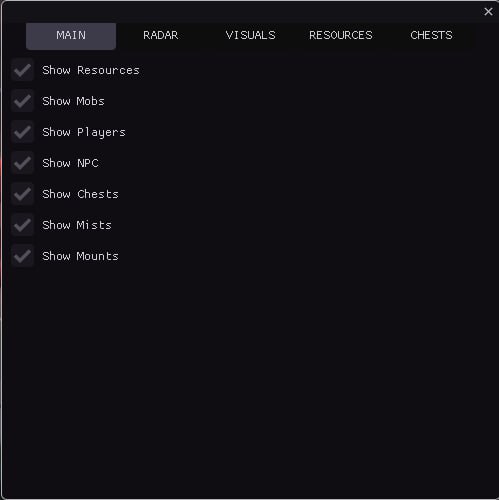
Show Resources / Display resources (wood stone ore etc.) Show Mobs / Display mobs Show Players / Display players Show NPCs / Display NPCs Show Chests / Display chests Show Mists / Display mist Show Mounts / Display mounts Counter of objects of each type / Displays the number of objects of each type on the radar with by type (CHEST MOB HARV etc.) Minimum/maximum distance for display / Filtering objects by distance objects outside the range are not displayed Sound notifications / Sound signals when different types of objects are detected (players chests resources) Tracking the nearest object / Automatically detects and displays information about the nearest object to the player Export coordinates to a file / Saves the coordinates of all detected objects to a text file (hotkey: F3) History of discovered objects / Tracks the history of discovered objects with time stamps Hotkeys / Quick access to functions: F1 (menu) F2 (save) F3 (export coordinates) Automatic configuration saving / Automatically saves settings every 30 seconds Displaying the distance to objects / Shows the distance in meters to each object on the radar Player approaching warning / Sound warning when other players approach a specified distance Grouping objects by type / Groups objects by type for easy analysis Direction indicator / Shows the direction on the radar Automatic hiding of distant objects / Automatically hides objects outside the scanning radius Detection time statistics / Tracks object detection statistics (first/last detection time number of detections) Improved sound notifications / Different sounds for different types of objects (chests resources players) Visual indicators / Pulsating circles for important objects (chests artifacts)

RESOURCES

Enable filter / Enable filter

CHESTS

Only 1-st TIER chests / Display 1st level chests Only 2-st TIER chests / Display 2nd level chests Only 3-st TIER chests / Display 3rd level chests Only 4-st TIER chests / Display 4th level chests

VISUAL EFFECTS

Lines to objects / Draws lines from the center of the radar to each object for better visualization Trajectories of movement / Displays movement traces of objects with adjustable length Visibility zones / Visualizes the scanning area Color gradients / Gradient coloring of objects Object animations / Pulsating effects for objects with adjustable speed Shadows / Shadows under objects to create the effect of depth Glow effects / Glow around objects Radar grid / Coordinate grid for better orientations Zone boundaries / Visual boundaries of the radar with corner markers Directional arrows / Arrows showing the direction to objects Object icons / Unique icons for different types of objects Gradient lines / Lines with a smooth color transition from beginning to end Contours of objects / Contours around objects with adjustable thickness Hover highlight / Highlighting objects when hovering the mouse Distance rings / Concentric rings for visualizing distances Particle effects / Particles around important objects (chests artifacts) Visual markers / Stars for important objects (chests artifacts) Pulsating effects / Pulsation of objects 3D depth effect / Depth effect for objects 3D depth effect / Эффект глубины для объектов

Making an order

Choose a convenient data plan to purchase the product.

1 day $2

3 days $4

7 days $7

30 days $20

Warning! Please make sure to check the System Requirements before purchasing. In case of incompatibility, no refunds will be issued.
Proceed to payment
By confirming the order, I accept the terms and conditions user agreement
Instant Key
Delivery
Secure
Checkout
First Launch
Guarantee

Have question or problem?

Support

FAQ for MASON-Radar Albion Online

Answers to the most popular questions and issues when using private cheat

What should I do if the software does not launch or shows an error?

First of all, make sure that Windows Defender and third-party antivirus software are completely disabled. Also, check that your operating system complies with the requirements in the «Requirements & Guide» tab. If the problem persists, our 24/7 technical support is always ready to assist you!

How fast will I receive the product after payment?

Delivery is fully automated. Immediately after successful payment, you will receive an email containing a link to download the launcher, step-by-step activation guide, and your unique license key.

Does using the cheat affect the security of my account (detect risk)?

Any private software carries a ban risk, but we do our best to minimize it: we utilize modern bypass methods and track the status of each cheat in real time. We recommend playing naturally and avoiding suspicious behavior.

What happens during technical game updates?

When a game updates, developers update the software to support the new game version. During updates, the cheat status changes to «On Update» and your active subscription time is frozen automatically, so you won't lose paid days.

User123
purchased MASON-Radar Albion Online for 24 hours
3 minutes ago